
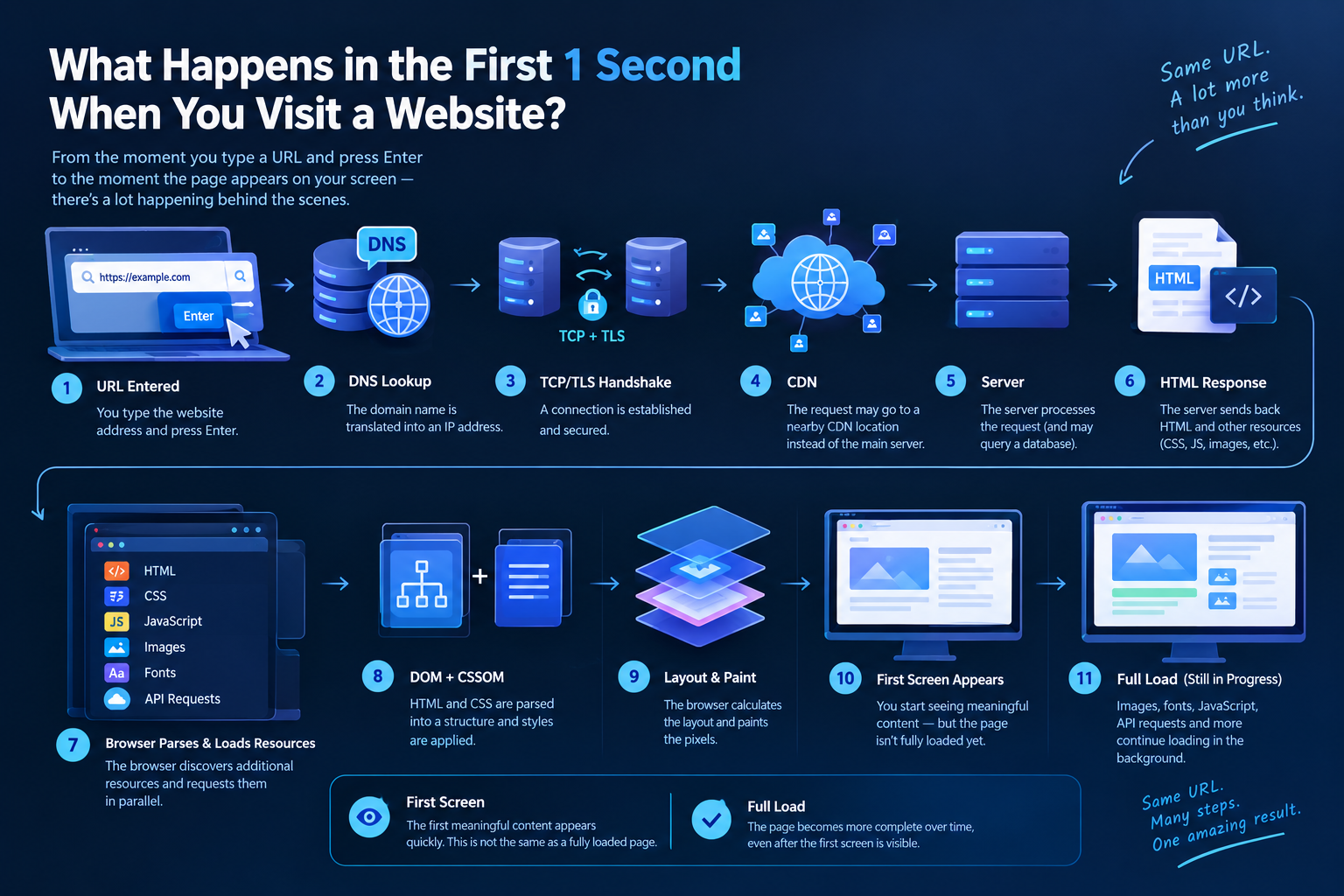
There is something we do dozens of times every day: open a browser, type a website address into the address bar, and press Enter.
A few seconds later—or often in a fraction of a second—the website appears on our screen.
But what actually happens during that time?
When you type something like:
https://example.com
into your browser, it doesn't simply connect to a server and download an HTML file.
First, the browser needs to figure out where the website is located. Then it establishes a connection, secures that connection, requests the necessary resources, and finally turns those resources into the webpage you see on your screen.
There is also an important distinction:
Seeing the first part of a webpage does not mean the entire page has finished loading.
In this article, we'll follow the journey from pressing Enter to seeing the first content on the screen—and then look at what continues happening in the background while the rest of the page loads.
First, the Browser Has to Understand the URL
When you enter a website address into your browser, you're providing a URL (Uniform Resource Locator).
For example:
https://www.example.com/blog
This URL contains several parts:
-
https→ The communication protocol -
www.example.com→ The domain name -
/blog→ The resource we're requesting
The browser first parses this URL to determine which server, protocol, and resource it needs to access.
But there is an important problem:
The browser may not know which IP address example.com is using.
That's where DNS comes in.
DNS: Turning a Domain Name Into an IP Address
Computers communicate across the internet using IP addresses.
For example, a server might have an IP address such as:
203.0.113.10
Remembering IP addresses for every website would obviously be impractical.
That's why we use domain names such as example.com.
DNS (Domain Name System) is the system that maps domain names to IP addresses.
The browser essentially needs to find out:
"What IP address does example.com point to?"
The DNS system finds the appropriate record and returns the IP address.
DNS Doesn't Always Start From Scratch
If you've visited the website before, your browser or operating system may already have the DNS information cached.
DNS information can also be cached at several other levels.
As a result, the DNS lookup can be much faster when the information is already available in a cache.
A TCP Connection Is Established
Once the browser knows the server's IP address, it needs to communicate with that server.
For connections using HTTP/1.1 or HTTP/2 over HTTPS, this traditionally involves TCP (Transmission Control Protocol).
TCP establishes a connection using a three-step process known as the TCP three-way handshake.
Simplified, it looks like this:
Browser → Server: SYN
Server → Browser: SYN-ACK
Browser → Server: ACK
Once this process is complete, the TCP connection is established.
The two sides can now exchange data.
But if we're using HTTPS, there is still another important step.
TLS Establishes a Secure Connection
Most modern websites use HTTPS.
HTTPS is essentially HTTP secured with TLS (Transport Layer Security).
Before sensitive HTTP communication can take place, the browser and server perform a TLS handshake.
During this process, they:
-
Agree on cryptographic parameters.
-
Authenticate the server using its certificate.
-
Establish the cryptographic keys needed for secure communication.
The result is an encrypted communication channel between the browser and the server.
The HTTP data exchanged afterward is protected against being read or modified by someone intercepting the connection.
If There Is a CDN, the Request May Go to a Nearby Location
Now the browser can start requesting the website's resources.
But the request doesn't necessarily have to travel all the way to the website's main server.
This is where a CDN (Content Delivery Network) can help.
A CDN is a distributed network of servers located in different regions around the world.
For example, a website's main server might be located in the United States, while a user in Europe receives static content from a CDN location much closer to them.
CDNs are particularly useful for resources such as:
-
CSS files
-
JavaScript files
-
Images
-
Fonts
-
Videos and other static content
If the requested resource is already cached at the CDN, the request may not need to reach the origin server at all.
This can significantly reduce latency and improve loading performance.
The Browser Sends an HTTP Request
Once the connection is ready, the browser can request the resource it needs.
Conceptually, an HTTP request might look like this:
GET /blog HTTP/2
Host: example.com
The basic idea is:
"Please send me the
/blogresource from example.com."
The server processes the request and sends an HTTP response.
For example:
HTTP/2 200 OK
Content-Type: text/html
The HTML content then begins traveling back to the browser.
The Server Gets Involved
Here's another important distinction.
Not every website simply sends a pre-existing HTML file.
Some websites are mostly static, while others execute application code whenever a request arrives.
The backend might be built with technologies such as:
-
PHP
-
Node.js
-
Python
-
Java
-
C#
-
Or another server-side technology
The server may:
-
Receive the request.
-
Analyze the URL.
-
Execute application code.
-
Query a database.
-
Process the required data.
-
Generate HTML.
-
Send the HTTP response back to the browser.
For example, a blog page might retrieve the article title, content, author, and publication date from a database before generating the response.
This is why website performance isn't determined only by your internet connection.
How quickly the server processes the request also matters.
Receiving HTML Doesn't Mean Everything Is Finished
Once the browser receives the HTML, it doesn't suddenly have everything it needs to display the complete website.
The HTML may reference additional resources:

When the browser discovers these references, it can start requesting those resources as well.
A single webpage can therefore result in dozens—or even hundreds—of individual network requests.
Conceptually:
HTML
 ├── CSS
 ├── JavaScript
 ├── Logo
 ├── Fonts
 ├── Images
 └── Other resources
This is one of the reasons why loading a modern website involves much more than downloading a single HTML document.
CSS Tells the Browser How the Page Should Look
HTML defines the structure of a webpage.
CSS defines how that structure should look.
For example:
body {
    font-family: Arial;
}

h1 {
    font-size: 32px;
}
The browser combines the HTML and CSS information to determine how the elements should be displayed.
This is where concepts such as the DOM (Document Object Model) and CSSOM (CSS Object Model) come into play.
The browser parses the HTML into a DOM structure.
It also processes the CSS rules to determine which styles apply to which elements.
JavaScript Adds Behavior
A website doesn't have to consist of only HTML and CSS.
JavaScript can make the page interactive.
For example:
-
A menu can open.
-
A button can display a dialog.
-
A form can be validated.
-
New data can be requested from a server.
-
Parts of the page can change dynamically.
Once JavaScript files are downloaded, they are processed by the browser's JavaScript engine.
This means that a website with a large amount of JavaScript can consume resources not only on the network side but also on the user's device.
The First Screen Can Appear Before the Page Is Fully Loaded
This is one of the most important distinctions to understand:
Seeing something on the screen does not mean the website has finished loading.
The browser doesn't necessarily wait for every resource to finish downloading before showing something to the user.
Instead, it can start rendering parts of the page as soon as enough information is available.
For example, when opening a news website, you might see:
-
The logo
-
The navigation menu
-
The page heading
-
Some text
-
A few images
very quickly.
Meanwhile, the browser may still be:
-
Downloading additional images.
-
Executing JavaScript.
-
Loading web fonts.
-
Fetching advertisements.
-
Waiting for API responses.
-
Preparing content further down the page.
So the first screen you see is not necessarily the fully loaded page.
What Is First Paint?
The browser's first rendering of pixels is commonly referred to as First Paint (FP).
Another important metric is First Contentful Paint (FCP), which measures when the browser first renders meaningful content such as text, an image, or other content from the page.
For example, when a heading, logo, or image first appears, the user can tell that the page has started rendering.
But the rest of the page may still be loading.
This is why web performance isn't only about asking:
"How long did the entire page take to load?"
It's also about asking:
"How quickly did the user start seeing meaningful content?"
How Does the Browser Actually Draw the Page?
After receiving the HTML, the browser parses it into a DOM (Document Object Model).
It also processes the CSS to determine how the elements should appear.
A simplified version looks like this:
HTML
 ↓
DOM + CSSOM
 ↓
Render Tree
 ↓
Layout
 ↓
Paint
 ↓
Pixels on the screen
Layout
The browser calculates the position and dimensions of the elements.
For example:
-
Where should the heading go?
-
How wide should the menu be?
-
How much space should the image occupy?
-
Where should each paragraph be placed?
Paint
The browser then paints text, colors, backgrounds, borders, images, and other visual elements.
This is how the information eventually becomes the pixels you see on your screen.
And while this is happening, the browser can continue loading and processing other resources.
First Screen vs. Full Load
Think of it like entering a restaurant.
If the menu arrives at your table, that doesn't mean your entire meal is ready.
The same idea applies to a website.
The First Screen
The user begins seeing the first meaningful part of the page.
The goal is:
Show the user something useful as quickly as possible.
Full Loading
More resources continue to load and the page becomes increasingly complete.
However, in modern web applications, there isn't always a single moment that can be called "completely loaded."
For example, the window.load event represents an important loading milestone involving the document and its dependent resources.
But JavaScript may continue making API requests, loading additional content, or modifying the page afterward.
So:
First screen ≠ Fully loaded
is a much more accurate way to think about modern websites.
Why Can Full Loading Take Longer?
The first screen may appear quickly while the rest of the page continues loading.
For example:
0 ms
│
├── DNS
├── Connection
├── TLS
├── HTML
│
├── First content appears
│        ↑
│        │
│    User starts seeing the page
│
├── CSS
├── JavaScript
├── Images
├── Fonts
├── API requests
│
└── The rest of the page continues loading
This is why measuring only the total loading time doesn't tell the whole story.
How quickly the user sees meaningful content can be just as important as how quickly the remaining resources finish loading.
So When Is the Page Actually "Ready"?
There isn't always a single answer.
Different milestones can happen at different times:
-
The first pixels are painted.
-
The first meaningful content appears.
-
The main content becomes visible.
-
The page becomes interactive.
-
Critical resources finish loading.
-
Additional dynamic content arrives.
Modern web applications can continue loading and updating content even after the initial page has appeared.
For example, on a social media website, the initial feed may appear first. When you scroll down, additional posts can be fetched from an API and inserted into the page.
So instead of thinking about webpage loading as one single event, modern web performance uses multiple metrics to describe different parts of the user experience.
The Process Isn't Exactly the Same for Every Website
The process we've described is an important simplification.
In the real world, things can be more complicated.
For example, modern browsers can use HTTP/3 and QUIC.
In that case, the connection doesn't follow the traditional TCP-based process described earlier.
DNS resolution can also happen in different ways.
The DNS information might already be cached by the browser, operating system, local network, or DNS resolver.
Similarly, if a CDN is involved, the exact path taken by the request depends on the website's infrastructure and configuration.
So it wouldn't be accurate to say:
"Every website follows exactly these ten steps."
A better way to describe it is:
The browser, network, and server coordinate many different operations to deliver and render a webpage as quickly as possible.
So What Really Happens When You Press Enter?
We can now summarize the process more accurately:
URL entered
    ↓
DNS / connection setup
    ↓
HTTP request
    ↓
CDN / Server
    ↓
HTML arrives
    ↓
CSS + JS + other resources are discovered
    ↓
DOM + CSSOM are created
    ↓
Layout + Paint
    ↓
FIRST SCREEN APPEARS
    ↓
Additional resources continue loading
    ↓
JavaScript / API operations
    ↓
Images and other content
    ↓
The page becomes progressively more complete
The most important point is this:
The moment the user starts seeing the page is not the same as the moment the browser has finished all of its work.
A well-optimized website doesn't necessarily wait for every resource to finish before showing something useful.
Instead, it tries to deliver meaningful content to the user as quickly as possible while the remaining resources continue loading in the background.
Conclusion: There's a Lot Happening Behind the Enter Key
When you type a website address and press Enter, you're actually triggering a surprisingly long chain of operations.
DNS maps the domain name to an IP address.
TCP or QUIC provides the underlying connection mechanism.
TLS secures HTTPS communication.
A CDN may deliver cached content from a location closer to the user.
The server processes the request and sends the required resources.
The browser then parses HTML, processes CSS and JavaScript, calculates the layout, paints the page, and turns all of that information into the pixels you see.
And there isn't necessarily one single moment when "the website loads."
First, the user may see the first meaningful content.
Then the browser continues working in the background while images, fonts, JavaScript, API responses, and other resources arrive.
All of this can happen in a matter of seconds—or often in much less than a second.
So the next time you open a website, don't think of it as simply "a page appearing."
Behind that seemingly instant experience, DNS servers, networks, CDNs, web servers, databases, browser engines, and your own device are all working together to turn a URL into the webpage you see.
No comments yet. Be the first to comment!